
Replace spreadsheets with software
Does your business run on a spreadsheet?We tell you when to replace it, and why.
Stock, orders, customers or quotes in sheets that get copied, overwritten and understood by only one person. We help you decide whether organising it is enough, whether a no-code tool will do, or whether custom software pays off.
- Free online check-up, about two minutes
- Real case: from spreadsheets and Drive to a dashboard that recommends prices
- If you don't need custom software, we tell you
Warning signs
Your spreadsheet has outgrown you if…
- There is a «stock_final_v3_good.xlsx» and nobody knows which file is the real one.
- Several people edit it at once and overwrite each other.
- The key formulas are understood by only one person.
- A bad copy and paste has already cost you a headache.
- There is no way for each person to see only their part.
- Nobody knows who changed a figure, or when.
Three ways out
Spreadsheet, no-code or custom: when each one suits you
- 01
Excel or Google Sheets, well organised
- When
- If there are few of you, the process is simple and nobody needs it on the phone.
- How far it goes
- It falls short as soon as several people edit at once or you need permissions and history.
- 02
A no-code tool
- When
- Airtable, AppSheet or Power Apps: for small teams that want forms, views and some automation without programming.
- How far it goes
- It gets complicated with your own business rules, with connecting to the ERP and with the per-user cost as the team grows. We don't set them up, but we tell you if they are enough.
- 03
Custom software
- When
- When several people need different permissions, there are business rules of your own, a link to the ERP or data that cannot be lost.
- How far it goes
- It costs more up front. It pays off when the spreadsheet is already costing you time, errors or opportunities.
Real case
A collectibles trader: from spreadsheets and Drive to a dashboard that recommends prices
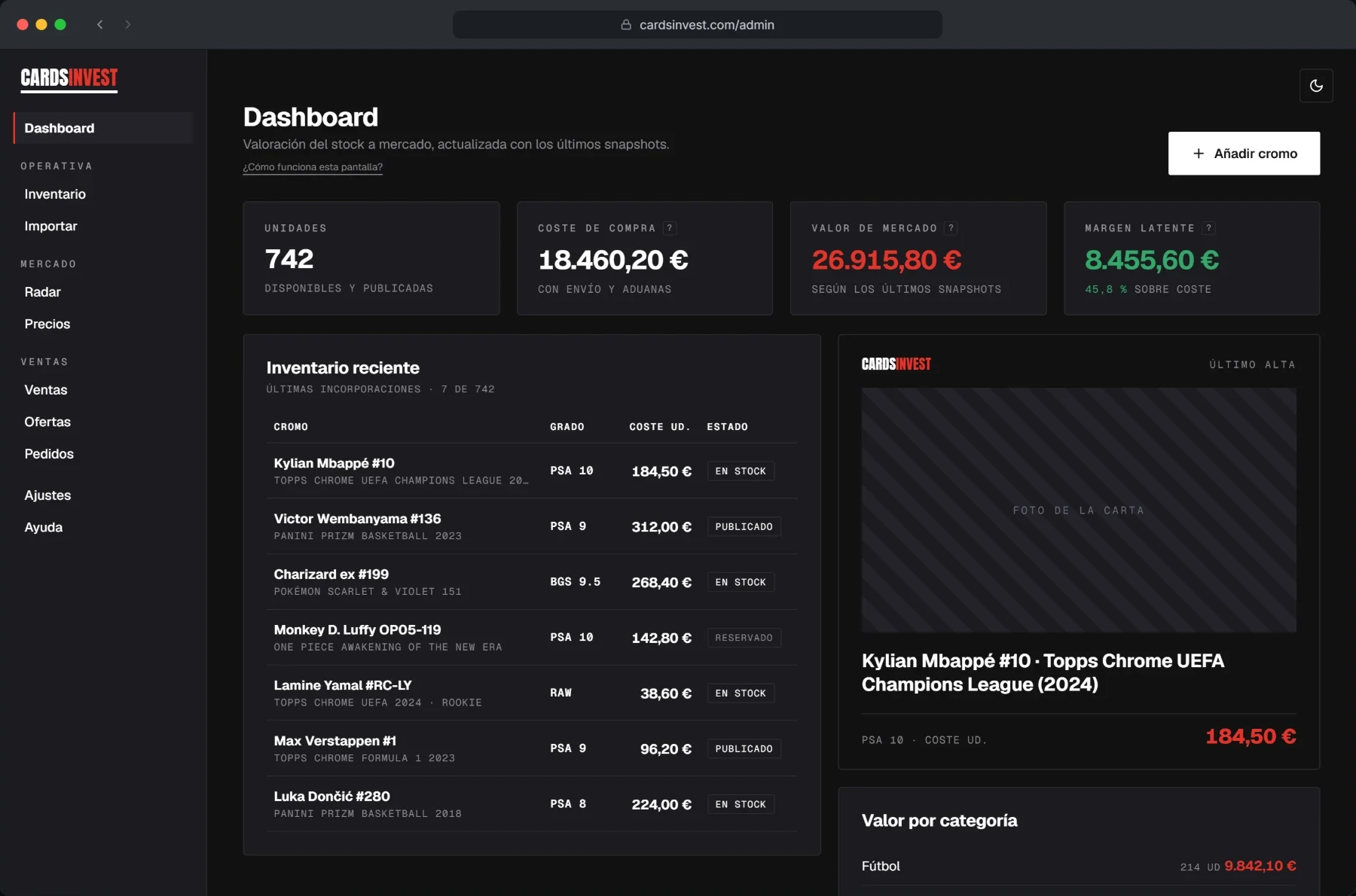
Before
Stock, purchases and sales lived in Excel sheets and Google Drive folders.
Now
- Stock in one place, always up to date.
- Daily stock valuation at market price.
- A recommended price to buy and sell at, based on the margin they want.
- Selling on several channels with a single inventory: anything sold on one disappears from the rest immediately.
What we do
From spreadsheet to software, without losing anything
We move your data
What is in your sheets moves into the software, checked along the way: no duplicates or rows lost in transit.
Users, permissions and history
Each person sees and edits their own part, and every change is logged with who made it and when.
Connected to what you already use
If you have an ERP or invoicing software, the app talks to it instead of duplicating the data.
Frequently asked questions
- What is the best alternative to Excel?
- It depends on how many people use it and what it has to do. For one person, a well-organised Excel or Google Sheets file is usually enough. For a small team, a no-code tool such as Airtable, AppSheet or Power Apps. If you need permissions, your own rules or a link to the ERP, custom software.
- Do you set up Airtable, AppSheet or Power Apps?
- No: we build custom software. But if the check-up shows one of those tools is enough for you, we tell you.
- What happens to the data I already have in Excel?
- It moves into the software and gets checked along the way. Duplicates and figures that don't add up are common, and it is better to fix them during the move than to carry them over.
- Can I keep using Excel for some things?
- Yes. The software can export to Excel whenever you need a one-off analysis. What changes is where the real data lives.
- How much does the check-up cost?
- Nothing. The questionnaire and the initial guidance are free.
Free online check-up
Tell us what you keep in spreadsheets
A few point-and-click questions. When you finish you see which way out fits, and within 24 working hours we write with the next steps.
- Free online check-up, about two minutes
- Real case: from spreadsheets and Drive to a dashboard that recommends prices
- If you don't need custom software, we tell you