
Custom business dashboard
A business dashboard to see your company without asking anyone for a spreadsheet.Plus the tools your ERP doesn't have.
Connected to your ERP so you see sales, margins and stock up to date, with custom tools for what the ERP doesn't handle: automatic purchase orders, Intrastat, or whatever you still do by hand.
- Free online check-up, about two minutes
- Real case in production on Holded
- No need to change ERP
First things first
What is a business dashboard
A business dashboard is a screen with the handful of indicators that tell you how the business is doing —sales, margins, stock, collections—, updated automatically and compared with what matters: last month, the same month last year or the target.
It is not a report. A report is requested, prepared and read once. A dashboard is always open and answers the question before anyone asks it.
Nor is it quite the «balanced scorecard» of management textbooks, which organises company goals into four perspectives: financial, customer, internal processes and learning. A dashboard can help track one, but what most companies need first is simpler: to see their numbers without waiting for anyone.
Sound familiar?
This is for you if…
- To know how the month is going you have to ask someone for a report.
- Every department has its own spreadsheet and the numbers don't match.
- The ERP holds all the data but doesn't show it the way you need.
- Some tasks the ERP can't do get done by hand: orders, declarations, reminders.
- Every Intrastat declaration means hunting down weights and tariff codes again.
Real case
A medical supplies distributor, on Holded
All the business data lived in the ERP, but to know how the month was going someone had to pull a report, export it and build it in a spreadsheet. Today management sees it instantly, and the dashboard does things the ERP couldn't.
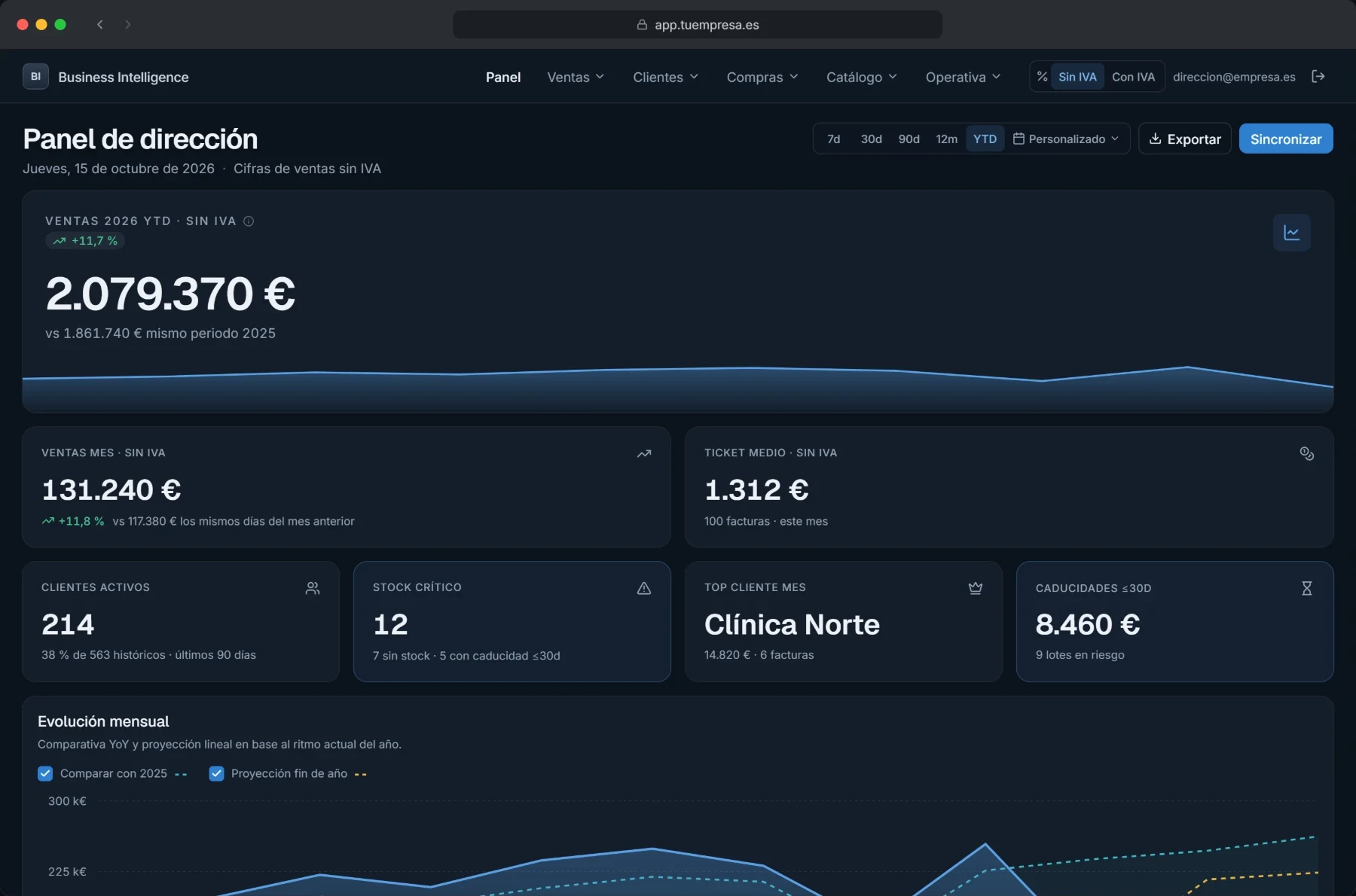
See
A management dashboard connected to Holded over its API: sales for the year and the month, average ticket, active customers, critical stock, expiry dates and monthly trend against last year.
Do
Automatic purchase orders
They are created in the ERP itself as purchase orders, with its sequential numbering, and sent to the supplier from the tool.
An Intrastat tool that learns
It reads invoices from the ERP or uploaded ones —spotting duplicates—, packing lists and transport delivery notes. It takes the weight from the product record and, if it's missing, lets you enter it and saves it. It remembers tariff codes, so each declaration asks for less than the last and comes out ready to file with the Spanish Tax Agency.
How we do it
On top of your ERP, not instead of it
Connected, not copied
Whenever the ERP allows it, we read its data through its API: the dashboard stays up to date and nobody has to export anything.
When it writes, it follows the rules
When a tool creates something in the ERP, such as a purchase order, it uses the ERP's numbering and fields, just as a person would.
No need to change ERP
The ERP stays the place where the data lives. We add what it lacks, with no migration.
Frequently asked questions
- What is a business dashboard?
- A screen with the business's key indicators, updated automatically and compared with the previous period or the target. Unlike a report, nobody has to request it: it is always up to date.
- Why not Power BI?
- If you already have Power BI and someone to maintain it, it may be enough to see your data. We come in when you also need tools that act on that data —creating orders, preparing Intrastat— or when you don't want to depend on maintaining the reports.
- What if my ERP has no API?
- We can start from periodic exports or, in some cases, its database. We look at it in the check-up and tell you what is possible with your ERP before quoting.
- Does it help with Intrastat?
- Yes: it is one of the tools we already have running. It prepares the declaration from invoices, packing lists and delivery notes, and remembers weights and tariff codes from one time to the next.
- Do I have to change ERP?
- No. We work on the one you already have: the dashboard and the tools read from it and, when needed, write to it.
- How much does the check-up cost?
- Nothing. The questionnaire and the initial guidance are free.
Free online check-up
Tell us what you work with
A few point-and-click questions. When you finish you see where we would start, and within 24 working hours we write with the next steps.
- Free online check-up, about two minutes
- Real case in production on Holded
- No need to change ERP